
Hi friends,
Welcome to yet another post on Pandas DataFrames. In the previous post under Data Science & Machine Learning, we discussed how to create a DataFrame using the Pandas library and perform basic operations on DataFrames. In this post, we discuss a more detailed usage of Pandas DataFrames for performing Data Analysis tasks.
Note: All the commands discussed below are run in the Jupyter Notebook environment. See this post on Jupyter Notebook to know about it in detail.
We use the same steps we used in the previous post to create a sample Pandas DataFrame:

So, let's starting working with some examples. So, if we wanted only the non-negative (>=0) elements of our DataFrame, we use Conditional Selection in the following manner:

We can apply Conditional Selection to individual columns as well. Here is the step to achieve the same:

Notice that the entire row corresponding to 'Y' index has been dropped from the result since the value corresponding to its column 'D' was negative.
Since the result of the above conditional selection is also a DataFrame, we can also select only a subset of columns from the resultant DataFrame. Here is an example selecting only the columns 'A' and 'E' of the resultant DataFrame:

What it is basically doing is first dropping the rows corresponding to which the value of the element is negative in the 'D' column and then selecting the columns 'A' and 'E' from the resultant DataFrame. It might appear intimidating if you are a beginner but you can grasp it better with practice.
We can also supply multiple conditions at the same time as well using the conditional operator & and |:
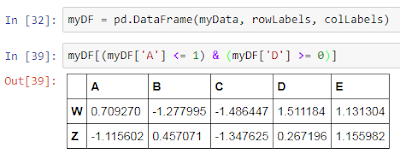

We can also change the index i.e. the row labels of the DataFrame using the set_index() method. However, there is a constraint with the set_index() method that the new row labels to be set should be one of the existing columns only. So, we first add a column to our DataFrame and use that temporary column to change the index using set_index() method:

Notice that first I have add a temporary column to our DataFrame which is later used to set the new index of our DataFrame.
With this, we end this post here on Conditional Selection on Pandas DataFrames. In the next post, we will learn Data Science techniques on how do we deal with missing values in a Pandas DataFrame.
We use the same steps we used in the previous post to create a sample Pandas DataFrame:

Conditional Selection on Pandas DataFrames
Just like we performed Conditional Selection on NumPy Arrays, we will learn to do the same with Pandas DataFrames in this post. Conditional Selection as described earlier allows us to access the elements of a particular data structure (here DataFrames) based on conditions i.e. select only those elements of the data structure for which the condition(s) is met.So, let's starting working with some examples. So, if we wanted only the non-negative (>=0) elements of our DataFrame, we use Conditional Selection in the following manner:
- Get the boolean array corresponding to each cell in the DataFrame based on its value
- Use the extracted boolean values to filter out the negative values


We can apply Conditional Selection to individual columns as well. Here is the step to achieve the same:

Notice that the entire row corresponding to 'Y' index has been dropped from the result since the value corresponding to its column 'D' was negative.
Since the result of the above conditional selection is also a DataFrame, we can also select only a subset of columns from the resultant DataFrame. Here is an example selecting only the columns 'A' and 'E' of the resultant DataFrame:

What it is basically doing is first dropping the rows corresponding to which the value of the element is negative in the 'D' column and then selecting the columns 'A' and 'E' from the resultant DataFrame. It might appear intimidating if you are a beginner but you can grasp it better with practice.
We can also supply multiple conditions at the same time as well using the conditional operator & and |:
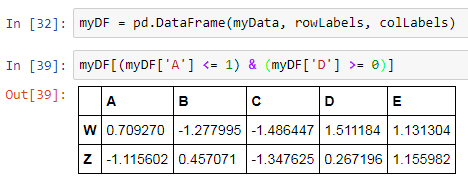

We can also change the index i.e. the row labels of the DataFrame using the set_index() method. However, there is a constraint with the set_index() method that the new row labels to be set should be one of the existing columns only. So, we first add a column to our DataFrame and use that temporary column to change the index using set_index() method:

Notice that first I have add a temporary column to our DataFrame which is later used to set the new index of our DataFrame.
With this, we end this post here on Conditional Selection on Pandas DataFrames. In the next post, we will learn Data Science techniques on how do we deal with missing values in a Pandas DataFrame.

DataFrames as a powerful data structure provided by the Pandas library for storing and managing structured data. A DataFrame is a two-dimensional table-like structure with rows and columns that can store different types of data such as numbers, text, and dates. It is widely used in data science because it allows efficient handling of large datasets and supports operations like indexing, filtering, sorting, updating, and deleting data.
ReplyDeletePandas DataFrames play an important role in machine learning because they simplify data preprocessing and analysis. They allow users to clean data, handle missing values, merge multiple datasets, and perform statistical operations before building machine learning models. Machine Learning Projects for Final Year.DataFrames can also import data from sources like CSV, Excel, and JSON files, making them highly useful for real-world applications. Their flexibility and ease of use make them essential for data preparation, visualization, and feature engineering in data science projects.
ReplyDeleteThis is a clear and practical introduction to working with Pandas DataFrames for data analysis. The step-by-step explanation of conditional selection makes the concept easier to understand, especially the idea of creating boolean values and then using them to filter elements based on specific conditions.
ReplyDeleteThe comparison with conditional selection on NumPy arrays is particularly helpful because it shows how similar concepts can be applied across Python's data-analysis tools. The examples also provide a useful foundation for learners who want to strengthen their practical skills through a Pandas Course.
ReplyDeleteI especially liked the explanation of filtering non-negative values and replacing unwanted negative values with NaN. Demonstrating both the multi-step approach and the possibility of achieving the same result in a single operation gives readers a better understanding of how DataFrames can be manipulated efficiently. These are valuable techniques within a Data Analysis Course.
ReplyDeleteThe use of Jupyter Notebook for demonstrating each operation also makes the examples practical and easy to reproduce. Exercises involving DataFrame creation, conditional filtering, and handling values can be extended into useful hands-on applications, making this a good foundation for Python Projects For Final Year.
ReplyDeleteOverall, the post provides a useful building block for understanding how Pandas supports real-world data manipulation. Conditional selection is an important skill when preparing and exploring datasets, and the concepts demonstrated here can be expanded into more comprehensive Data Science Projects for Final Year.